<!DOCTYPE html>
	<html lang="vi" xmlns="http://www.w3.org/1999/xhtml" prefix="og: http://ogp.me/ns#">
	<head>
<title>Cách chuyển nội dung từ file PDF sang Word trên điện thoại</title>
<meta name="description" content="Cách chuyển nội dung từ file PDF sang Word trên điện thoại - Savefile - Tin Tức -...">
<meta name="author" content="Trung tâm Công tác xã hội - giáo dục nghề nghiệp cho người khuyết tật Hà Tĩnh">
<meta name="copyright" content="Trung tâm Công tác xã hội - giáo dục nghề nghiệp cho người khuyết tật Hà Tĩnh [admin@nukeviet.vn]">
<meta name="generator" content="NukeViet v4.4">
<meta http-equiv="Content-Type" content="text/html; charset=utf-8">
<meta property="og:title" content="Cách chuyển nội dung từ file PDF sang Word trên điện thoại">
<meta property="og:type" content="website">
<meta property="og:description" content="Savefile - Tin Tức - https&#x3A;&#x002F;&#x002F;trungtamcongtacxahoi.hatinh.vn&#x002F;savefile&#x002F;kinh-te-xa-hoi&#x002F;cach-chuyen-noi-dung-tu-file-pdf-sang-word-tren-dien-thoai-10794.html">
<meta property="og:site_name" content="Trung tâm Công tác xã hội - giáo dục nghề nghiệp cho người khuyết tật Hà Tĩnh">
<meta property="og:url" content="https://trungtamcongtacxahoi.hatinh.vn/kinh-te-xa-hoi/cach-chuyen-noi-dung-tu-file-pdf-sang-word-tren-dien-thoai-10794.html">
<link rel="shortcut icon" href="https://trungtamcongtacxahoi.hatinh.vn/favicon.ico">
<link rel="canonical" href="https://trungtamcongtacxahoi.hatinh.vn/kinh-te-xa-hoi/cach-chuyen-noi-dung-tu-file-pdf-sang-word-tren-dien-thoai-10794.html">
<link rel="alternate" href="https://trungtamcongtacxahoi.hatinh.vn/rss/" title="Tin Tức" type="application/rss+xml">
<link rel="alternate" href="https://trungtamcongtacxahoi.hatinh.vn/rss/ctxh/" title="Tin Tức - Công tác xã hội" type="application/rss+xml">
<link rel="alternate" href="https://trungtamcongtacxahoi.hatinh.vn/rss/quytreem/" title="Tin Tức - Quỹ bảo trợ trẻ em" type="application/rss+xml">
<link rel="alternate" href="https://trungtamcongtacxahoi.hatinh.vn/rss/daynghe/" title="Tin Tức - Giáo dục nghề nghiệp" type="application/rss+xml">
<link rel="alternate" href="https://trungtamcongtacxahoi.hatinh.vn/rss/kinh-te-xa-hoi/" title="Tin Tức - Kinh tế - xã hội" type="application/rss+xml">
<link rel="preload" as="script" href="https://trungtamcongtacxahoi.hatinh.vn/assets/js/jquery/jquery.min.js">
<link rel="preload" as="script" href="https://trungtamcongtacxahoi.hatinh.vn/assets/js/language/vi.js">
<link rel="preload" as="script" href="https://trungtamcongtacxahoi.hatinh.vn/assets/js/global.js">
<link rel="preload" as="script" href="https://trungtamcongtacxahoi.hatinh.vn/themes/default/js/news.js">
<link rel="preload" as="script" href="https://trungtamcongtacxahoi.hatinh.vn/assets/js/jquery/jquery.cookie.js">
<link rel="preload" as="script" href="https://trungtamcongtacxahoi.hatinh.vn/themes/egov/js/main.js">
<link rel="preload" as="script" href="https://trungtamcongtacxahoi.hatinh.vn/themes/egov/js/custom.js">
<link rel="preload" as="script" href="https://trungtamcongtacxahoi.hatinh.vn/themes/egov/js/bootstrap.min.js">
<link rel="StyleSheet" href="https://trungtamcongtacxahoi.hatinh.vn/assets/css/font-awesome.min.css">
<link rel="StyleSheet" href="https://trungtamcongtacxahoi.hatinh.vn/themes/egov/css/bootstrap.non-responsive.css">
<link rel="StyleSheet" href="https://trungtamcongtacxahoi.hatinh.vn/themes/egov/css/style.css">
<link rel="StyleSheet" href="https://trungtamcongtacxahoi.hatinh.vn/themes/egov/css/style.non-responsive.css">
<link rel="StyleSheet" href="https://trungtamcongtacxahoi.hatinh.vn/themes/egov/css/custom.css">
<link rel="StyleSheet" href="https://trungtamcongtacxahoi.hatinh.vn/themes/egov/css/style-blue.css">
<link rel="StyleSheet" href="https://trungtamcongtacxahoi.hatinh.vn/themes/egov/css/news.css">
<style>
	body{background: #fff;}
</style>
	</head>
	<body>
<div id="print">
	<div id="hd_print">
		<h2 class="pull-left">Trung tâm Công tác xã hội - giáo dục nghề nghiệp cho người khuyết tật Hà Tĩnh</h2>
		<p class="pull-right"><a title="Trung tâm Công tác xã hội - giáo dục nghề nghiệp cho người khuyết tật Hà Tĩnh" href="https://trungtamcongtacxahoi.hatinh.vn/">https://trungtamcongtacxahoi.hatinh.vn</a></p>
	</div>
	<div class="clear"></div>
	<hr />
	<div id="content">
		<h1>Cách chuyển nội dung từ file PDF sang Word trên điện thoại</h1>
		<ul class="list-inline">
			<li>Thứ bảy - 06/09/2025 21:16</li>
			<li class="hidden-print txtrequired"><em class="fa fa-print">&nbsp;</em><a title="In ra" href="javascript:;" onclick="window.print()">In ra</a></li>
			<li class="hidden-print txtrequired"><em class="fa fa-power-off">&nbsp;</em><a title="Đóng cửa sổ này" href="javascript:;" onclick="window.close()">Đóng cửa sổ này</a></li>
		</ul>
		<div class="clear"></div>
		<div id="hometext">
		</div>
		<div id="bodytext" class="clearfix">
			<h2>(Baohatinh.vn) - Chuyển PDF sang Word trên điện thoại giúp bạn chỉnh sửa tài liệu nhanh chóng mọi lúc, mọi nơi mà không cần máy tính.</h2>
chia sẻ<a href="https://baohatinh.vn/cach-chuyen-noi-dung-tu-file-pdf-sang-word-tren-dien-thoai-post295147.html?gidzl=jhUrQzNgFGspgB9hrVC-2h6cjchC-pjQgAFcFf_-Rrxzg-CycgO-2_3yisl0fMmDeV6nE3DJRBvHr-a-0m#comment295147" title="Bình luận">0</a>

<figure><img alt="Cách chuyển từ file PDF sang Word trên điện thoại hiệu quả" data-adbro-processed="true" data-large-src="https://cdn.baoquocte.vn/stores/news_dataimages/2025/082025/13/07/cach-chuyen-tu-file-pdf-sang-word-tren-dien-thoai-hieu-qua-520250813070030.webp?rt=202509062107" data-src="https://cdn.baoquocte.vn/stores/news_dataimages/2025/082025/13/07/cach-chuyen-tu-file-pdf-sang-word-tren-dien-thoai-hieu-qua-520250813070030.webp?rt=202509062107" src="https://cdn.baoquocte.vn/stores/news_dataimages/2025/082025/13/07/cach-chuyen-tu-file-pdf-sang-word-tren-dien-thoai-hieu-qua-520250813070030.webp?rt=202509062107" title="Cách chuyển từ file PDF sang Word trên điện thoại hiệu quả" />
<figcaption>Cách chuyển từ file PDF sang Word trên điện thoại hiệu quả</figcaption>
</figure>

<p>Chuyển đổi file PDF sang Word trên điện thoại là cách nhanh gọn giúp bạn chỉnh sửa tài liệu mọi lúc, mọi nơi mà không cần dùng máy tính. Chỉ với một vài bước đơn giản, bạn có thể biến file PDF thành văn bản Word để thêm, xóa hoặc định dạng lại nội dung theo ý muốn. Cùng xem hướng dẫn chi tiết ngay sau đây.</p>

<p><strong>Cách chuyển file PDF sang Word trên điện thoại</strong></p>

<p><strong>Bước 1:</strong>&nbsp;Mở trình duyệt và truy cập vào trang web hỗ trợ chuyển đổi PDF sang Word qua đường link tại đây. Đây là công cụ trực tuyến nên bạn không cần cài đặt ứng dụng, phù hợp với mọi loại điện thoại.</p>

<figure><img alt="Mở trình duyệt và truy cập vào trang web" data-large-src="https://cdn.baoquocte.vn/stores/news_dataimages/2025/082025/13/07/cach-chuyen-tu-file-pdf-sang-word-tren-dien-thoai-hieu-qua-420250813070028.webp?rt=202509062107" data-src="https://cdn.baoquocte.vn/stores/news_dataimages/2025/082025/13/07/cach-chuyen-tu-file-pdf-sang-word-tren-dien-thoai-hieu-qua-420250813070028.webp?rt=202509062107" src="https://cdn.baoquocte.vn/stores/news_dataimages/2025/082025/13/07/cach-chuyen-tu-file-pdf-sang-word-tren-dien-thoai-hieu-qua-420250813070028.webp?rt=202509062107" title="Mở trình duyệt và truy cập vào trang web" />
<figcaption>Mở trình duyệt và truy cập vào trang web</figcaption>
</figure>

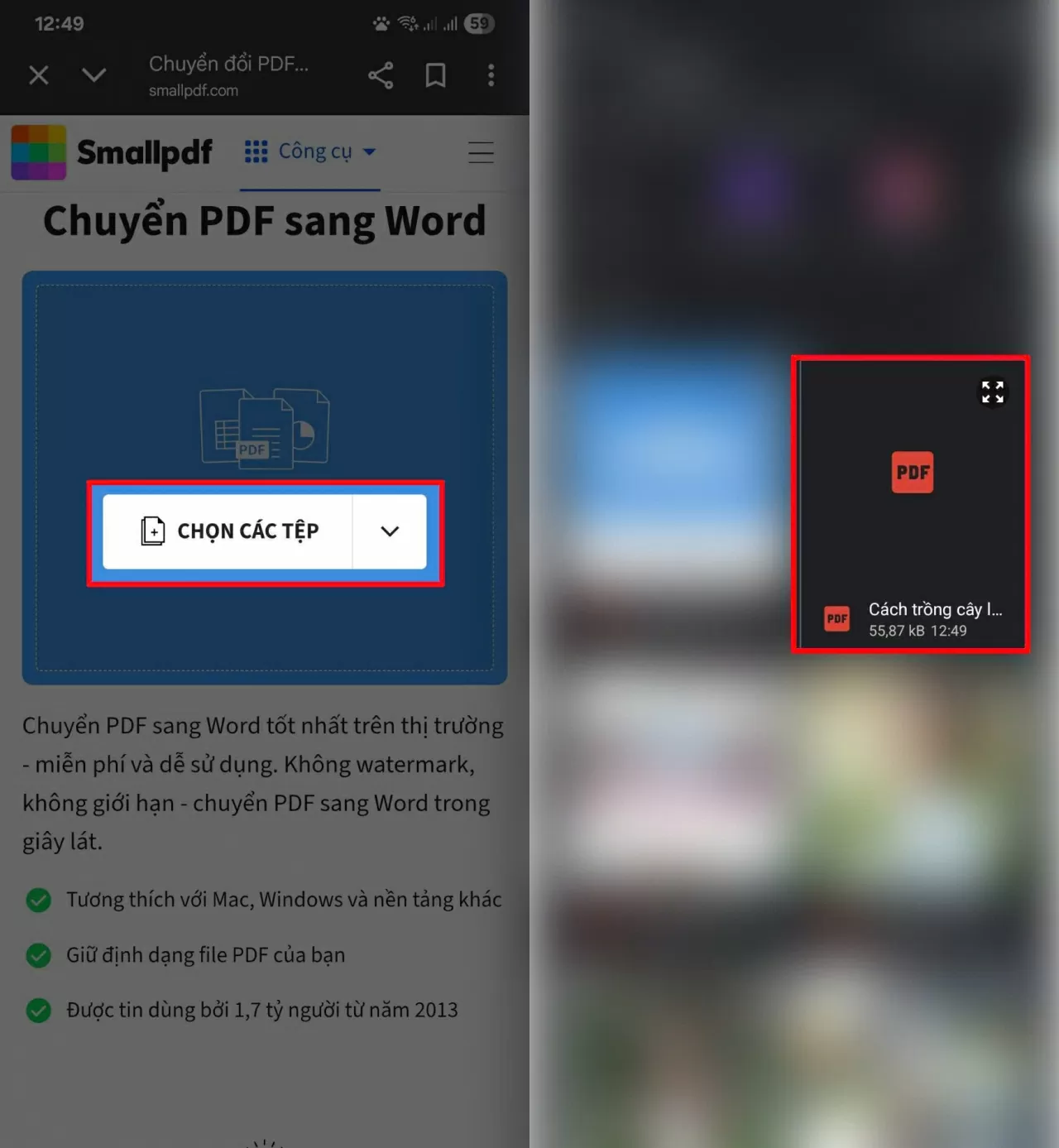
<p><strong>Bước 2:</strong>&nbsp;Tại giao diện chính, tìm và chọn mục “Tải tệp lên” hoặc “Upload file”. Hãy chọn file PDF cần chuyển đổi từ bộ nhớ máy hoặc từ các dịch vụ lưu trữ đám mây như Google Drive, tùy vào trang web bạn sử dụng.</p>

<figure><img alt="Tìm và chọn mục “Tải tệp lên” hoặc “Upload file”." data-large-src="https://cdn.baoquocte.vn/stores/news_dataimages/2025/082025/13/07/cach-chuyen-tu-file-pdf-sang-word-tren-dien-thoai-hieu-qua-220250813070026.webp?rt=202509062107" data-src="https://cdn.baoquocte.vn/stores/news_dataimages/2025/082025/13/07/cach-chuyen-tu-file-pdf-sang-word-tren-dien-thoai-hieu-qua-220250813070026.webp?rt=202509062107" src="https://cdn.baoquocte.vn/stores/news_dataimages/2025/082025/13/07/cach-chuyen-tu-file-pdf-sang-word-tren-dien-thoai-hieu-qua-220250813070026.webp?rt=202509062107" title="Tìm và chọn mục “Tải tệp lên” hoặc “Upload file”." />
<figcaption>Tìm và chọn mục “Tải tệp lên” hoặc “Upload file”.</figcaption>
</figure>

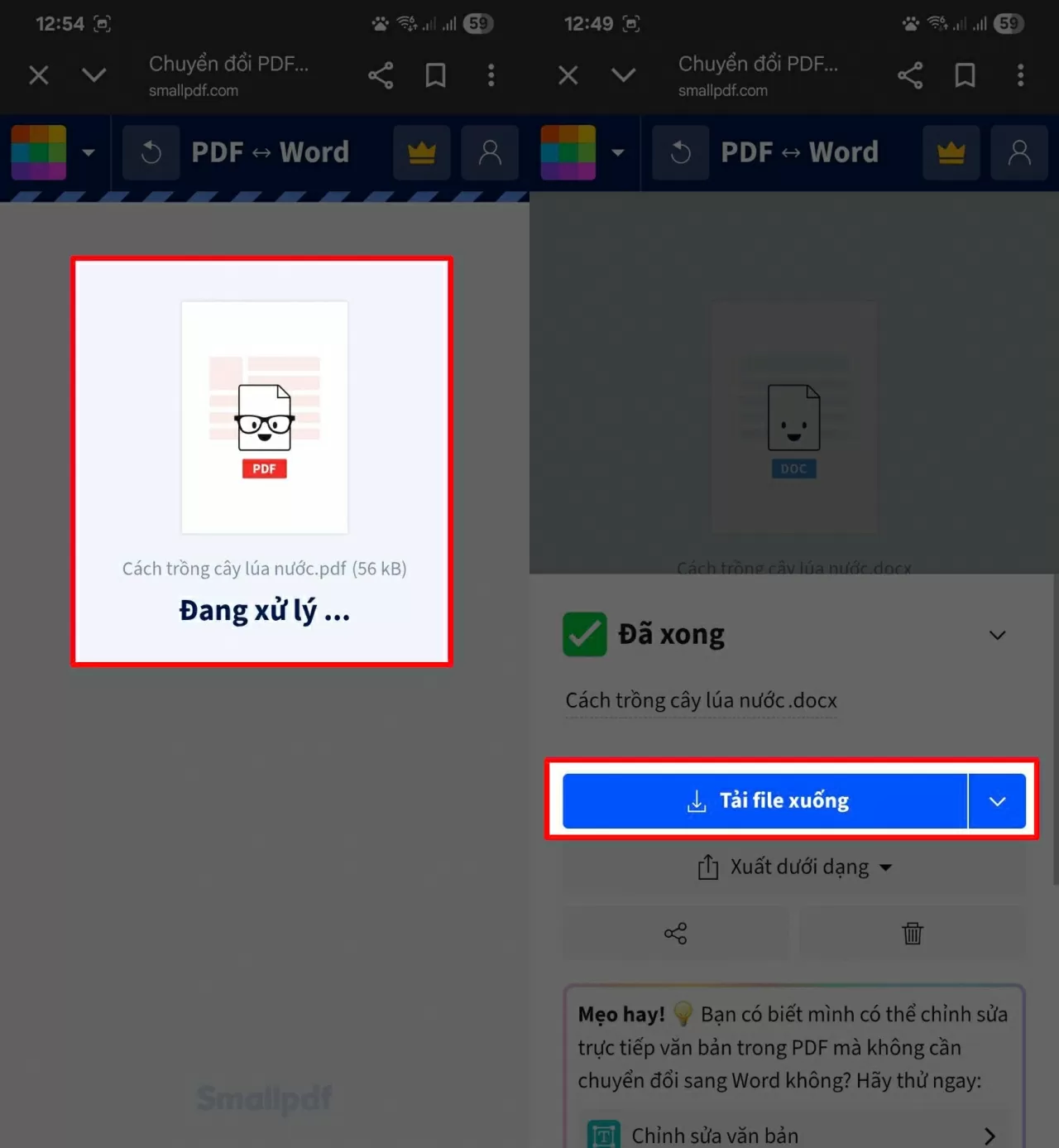
<p><strong>Bước 3:</strong>&nbsp;Sau khi tải file, hệ thống sẽ tự động chuyển đổi. Chờ vài giây, rồi nhấn “Tải xuống” để lấy file Word về điện thoại.</p>

<figure><img alt="Chờ vài giây, rồi nhấn “Tải xuống”" data-large-src="https://cdn.baoquocte.vn/stores/news_dataimages/2025/082025/13/07/cach-chuyen-tu-file-pdf-sang-word-tren-dien-thoai-hieu-qua-120250813070023.webp?rt=202509062107" data-src="https://cdn.baoquocte.vn/stores/news_dataimages/2025/082025/13/07/cach-chuyen-tu-file-pdf-sang-word-tren-dien-thoai-hieu-qua-120250813070023.webp?rt=202509062107" src="https://cdn.baoquocte.vn/stores/news_dataimages/2025/082025/13/07/cach-chuyen-tu-file-pdf-sang-word-tren-dien-thoai-hieu-qua-120250813070023.webp?rt=202509062107" title="Chờ vài giây, rồi nhấn “Tải xuống”" />
<figcaption>Chờ vài giây, rồi nhấn “Tải xuống”</figcaption>
</figure>

<p>Khi đã tải xong, bạn sẽ tìm thấy file Word trong thư mục&nbsp;<em>Tệp</em>&nbsp;hoặc&nbsp;<em>Tải xuống</em>. Giờ đây bạn có thể mở, chỉnh sửa, định dạng lại hoặc sao chép nội dung theo ý muốn một cách nhanh chóng.</p>
		</div>
				<div id="author">
						<p>
				<strong>Nguồn tin:</strong>
				Theo Báo Hà Tĩnh:
			</p>
		</div>
	</div>
	<div id="footer" class="clearfix">
		<div id="url">
			<strong>URL của bản tin này: </strong><a href="https://trungtamcongtacxahoi.hatinh.vn/kinh-te-xa-hoi/cach-chuyen-noi-dung-tu-file-pdf-sang-word-tren-dien-thoai-10794.html" title="Cách chuyển nội dung từ file PDF sang Word trên điện thoại">https://trungtamcongtacxahoi.hatinh.vn/kinh-te-xa-hoi/cach-chuyen-noi-dung-tu-file-pdf-sang-word-tren-dien-thoai-10794.html</a>

		</div>
		<div class="clear"></div>
		<div class="copyright">
			&copy; Trung tâm Công tác xã hội - giáo dục nghề nghiệp cho người khuyết tật Hà Tĩnh
		</div>
		<div id="contact">
			<a href="mailto:admin@nukeviet.vn">admin@nukeviet.vn</a>
		</div>
	</div>
</div>
        <div id="timeoutsess" class="chromeframe">
            Bạn đã không sử dụng Site, <a onclick="timeoutsesscancel();" href="https://trungtamcongtacxahoi.hatinh.vn/#">Bấm vào đây để duy trì trạng thái đăng nhập</a>. Thời gian chờ: <span id="secField"> 60 </span> giây
        </div>
        <div id="openidResult" class="nv-alert" style="display:none"></div>
        <div id="openidBt" data-result="" data-redirect=""></div>
<script src="https://trungtamcongtacxahoi.hatinh.vn/assets/js/jquery/jquery.min.js"></script>
<script>var nv_base_siteurl="/",nv_lang_data="vi",nv_lang_interface="vi",nv_name_variable="nv",nv_fc_variable="op",nv_lang_variable="language",nv_module_name="news",nv_func_name="savefile",nv_is_user=0, nv_my_ofs=-4,nv_my_abbr="EDT",nv_cookie_prefix="nv4",nv_check_pass_mstime=1738000,nv_area_admin=0,nv_safemode=0,theme_responsive=0,nv_is_recaptcha=0;</script>
<script src="https://trungtamcongtacxahoi.hatinh.vn/assets/js/language/vi.js"></script>
<script src="https://trungtamcongtacxahoi.hatinh.vn/assets/js/global.js"></script>
<script src="https://trungtamcongtacxahoi.hatinh.vn/themes/default/js/news.js"></script>
<script src="https://trungtamcongtacxahoi.hatinh.vn/assets/js/jquery/jquery.cookie.js"></script>
<script src="https://trungtamcongtacxahoi.hatinh.vn/themes/egov/js/main.js"></script>
<script src="https://trungtamcongtacxahoi.hatinh.vn/themes/egov/js/custom.js"></script>
<script src="https://trungtamcongtacxahoi.hatinh.vn/themes/egov/js/bootstrap.min.js"></script>
</body>
</html>